Quick Start Guide
This guide explains how to integrate
Ozeki VoIP SIP SDK quickly in your application to boost its functionality.
The information below help you start using the SDK right after download.
You will get a basic scope about the possibilities of using Ozeki VoIP SIP SDK
and about the solutions you can build with it.
Introduction
Ozeki VoIP SIP SDK is an excellent software development kit
that allows you to establish VoIP calls from your application easily and
quickly. You do not need to have expert programming skills, with the most basic
programming knowledge you will be able to create extraordinary VoIP solutions with this tool.
After download you just integrate Ozeki VoIP SIP SDK into your application and it is ready to make VoIP
calls immediately.
This guide will show how you can start to use Ozeki VoIP SIP SDK and it will
give you tips about the VoIP solutions you can write with the support of this SDK. After reading
this article you will be familiar with your possibilities and you will be able to decide,
which VoIP solution you need in order to make your company work more effective and profitable.
At first, you will get the basic information about the requirements and the
configuration of the SDK, then the guide will give you a description about the
VoIP solutions you can implement using this SDK. If any solution catches your attention,
this guide shows which of the pages will give you more detailed information about the
given topic.
First of all, you will need to know the exact environment you will need to set up
for working with this SDK. You will learn about the requirements of the SDK in the next section.
Requirements
Ozeki VoIP SIP SDK is basically a .NET solution so, you will need to have the development
environment and background tools for .NET to be able to use the SDK. The basic developer requirements are shown
in Figure 1.

Figure 1 - Basic requirements for creating your own VoIP solution
The following list shows all the requirements you will need if you want to build a
VoIP solution with Ozeki VoIP SIP SDK.
- PC (Windows XP; Vista, 7, 2003, 2008 operating system)
- .Net compatible development kit (e.g. Visual Studio 2010 / Visual C#)
- Minimum .Net 3.5 SP1
- Ozeki VoIP SIP SDK
Note that you may also need a SIP account from your service provider in case of
some VoIP solutions. You can find more information about this topic in the sections and articles
about the given solutions.
Download and install Ozeki VoIP SIP SDK
You can download and use the free trial version of Ozeki VoIP SIP SDK using the link below.
The trial version has some limitations but you can try all the functionalities
of the SDK with the trial. If you have decided to build a more professional VoIP Solution, you can choose from the
wide selection of licenses and buy the SDK with the exact functionalities you want to use.
After downloading Ozeki VoIP SIP SDK, you will need to install it to your computer. The installation
wizard will lead you through this process. You can change some basic settings during the
installation, like the target folder but you can also install the SDK without any
modifications.
It is essential to know that if you installed the SDK into a different folder than the
default, you will find the .dll to be registered to your programs in that folder.
Getting started
When you want to create a VoIP solution in Visual Studio with the background support
of Ozeki VoIP SIP SDK, you will need to register the SDK .dll file to the Visual Studio Project.
When you create a new project in Visual Studio using File->New->Project... menu, you will get
a basic .NET solution that has the support of the built-in .NET .dll-s. If you want to use
any other .dll tools, you can register your .dll to your project.
In the Solution Explorer panel that is usually on the right side of the
Visual Studio window, you need to right click on the
References label and select Add reference... from the pop-up list (Figure 2).
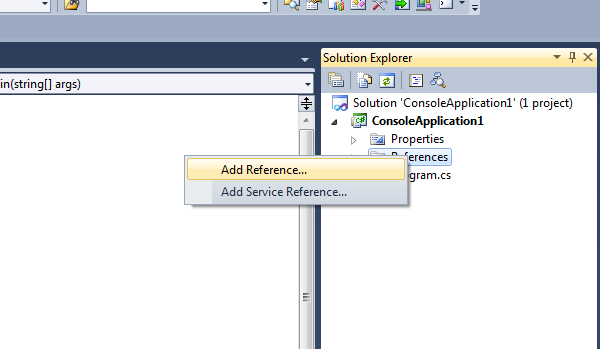
Figure 2 - Add reference option
On the Add Reference window, you will need to choose the Browse tab
and you can browse your hard drive for the VoIPSDK.dll file (Figure 3).
If you installed your SDK without interaction, the .dll file will be stored in
the "C:\Program Files\Ozeki\VoIP SIP SDK\SDK\" folder.
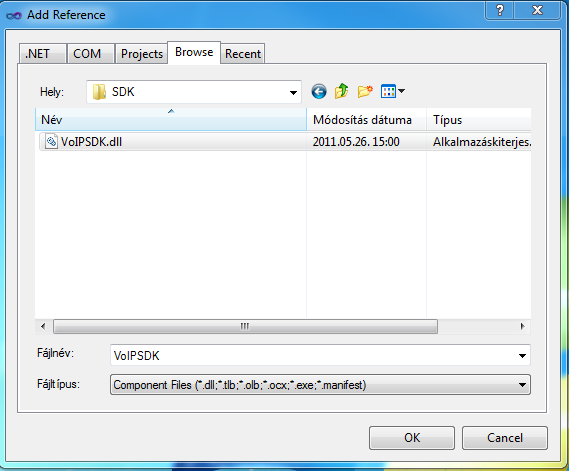
Figure 3 - Select VoIPSDK.dll
After registering your SDK to the Visual Studio project, you can start to build your
own VoIP solution. In the next section, you will learn about the basic steps that are
similar in case of many VoIP applications, and after these you can find the exact solutions that can be built
using Ozeki VoIP SIP SDK.
First Steps
When you registered the Ozeki VoIP SIP SDK to your Visual Studio project you will be able to
use all the tools it provides. The .dll defines the SDK tools is certain namespaces, and
if you want to use a tool from outside the namespace, you need to label it with the whole
namespace path (namespaces can be nested into each other like common folders) or
you can use the using section to indicate what namespace's tools you will use.
Code 1 shows the using instruction that will be essentially needed if you want to use the
Ozeki VoIP SIP SDK tools without namespace labeling. For example, without the 2nd line in Code 1
the microphone had to be referred to as an Ozeki.Media.MediaHandlers.Microphone object,
while with that line you can use the name Microphone as it was defined in the same
namespace as your project.
- using Ozeki.Media;
- using Ozeki.Media.MediaHandlers;
- using Ozeki.Network.Nat;
- using Ozeki.VoIP;
- using Ozeki.VoIP.Media;
- using Ozeki.VoIP.SDK;
- using Ozeki.Media.MediaHandlers.Facade;
using Ozeki.Media;
using Ozeki.Media.MediaHandlers;
using Ozeki.Network.Nat;
using Ozeki.VoIP;
using Ozeki.VoIP.Media;
using Ozeki.VoIP.SDK;
using Ozeki.Media.MediaHandlers.Facade;
Code 1 - With these lines you can use the SDK tools without namespace path labeling
There are some tools that are used in almost every VoIP solutions. Code 2 shows these tools that
are essential for the VoIP communication.
- IPhoneLine phoneLine;
- PhoneLineState phoneLineInformation;
- IPhoneCall call;
- Microphone microphone = Microphone.GetDefaultDevice();
- Speaker speaker = Speaker.GetDefaultDevice();
- MediaConnector connector = new MediaConnector();
- PhoneCallAudioSender mediaSender = new PhoneCallAudioSender();
- PhoneCallAudioReceiver mediaReceiver = new PhoneCallAudioReceiver();
IPhoneLine phoneLine;
PhoneLineState phoneLineInformation;
IPhoneCall call;
Microphone microphone = Microphone.GetDefaultDevice();
Speaker speaker = Speaker.GetDefaultDevice();
MediaConnector connector = new MediaConnector();
PhoneCallAudioSender mediaSender = new PhoneCallAudioSender();
PhoneCallAudioReceiver mediaReceiver = new PhoneCallAudioReceiver();
Code 2 - The essential tools for VoIP programs
If you want to build a VoIP communication program, you will definitely need at least one phone line
through which you will communicate. The IPhoneLine class can be found in the Ozeki.VoIP
namespace and the object itself can be created by using for example a softphone object (see below).
If you communicate through a line, you will need to know some information about the
line itself. It is essential as the line state change can influence the communication.
The VoIP communication is made through a call object that is the instance of the IPhoneCall
class provided by Ozeki VoIP SIP SDK. This is initialized according to the actual
VoIP solution you build.
The VoIP communication uses two basic audio devices, the microphone and the speaker.
The support for these is built in the Ozeki VoIP SIP SDK. You only need to initialize
a Microphone and a Speaker object and you can start and stop them according to your needs.
The VoIP communication is basically made by connecting the devices and the transmission
object together. For this purpose, you need a MediaConnector object that is responsible
for connecting all the tools together.
For sending and receiving the audio data, you need an AudioSender and an AudioReceiver object.
For the video data you can define VideoSender and VideoReceiver objects, too.
These objects are provided by the Ozeki MediaGateway SDK. You only initialize them and you can use all the functions you need.
Now you are familiar with the basic tools you need when you want to create a VoIP
communication program. If you want to put it in the simplest way, VoIP communication is build up
as the following list shows.
- You establish a phone line and subscribe for the phone line information
- You initialize a call and subscribe for the call's events
- You start the audio peripherals (microphone, speaker)
- You connect the microphone to the media sender
- You connect the speaker to the media receiver
- You start the communication
There are, of course, some more settings and method calls you need to do, but basically these steps
describe the VoIP communication well. Now you are familiar with the basics, let's see
what solution you can build with Ozeki VoIP SIP SDK.
Solutions you can build
The solutions you can make with Ozeki VoIP SIP SDK are of a great variation depending on
your actual needs and possibilities. VoIP communication can grant you free communication
as well as easy access of the Public Social Telephone Network (PSTN), but in that case
you will need to pay the local fees.
When choosing a VoIP application, you need to decide the exact purpose. There is a possibility to
build a window application, you can create embedded solutions for your webpage or
you can even make some professional solutions like Interactive Voice Response system or a
Call center. You also have the possibility to record the media streams.
Softphone
The software phone or softphone is a VoIP solution that is capable for audio or video communication
via Session Initiation Protocol. This is made through a PBX that handles the SIP
accounts for the call. The PBX is a software or a hardware that makes the connection between
the softphone programs, and for this purpose it uses the so-called SIP accounts.
To learn more about softphone technology and try some softphone examples, please
visit
How to build a softphone pages >>>
Webphone
If you want to make your corporate communication more effective, you can use a webphone.
The webphone is a web page embedded program that can be connected to your customer service center
so your customers can reach you during visiting your website.
For further information about webphone technology and webphone examples, please go to
Webphone technology pages >>>
Call center
Call centers are professional VoIP solutions that can make your company work effective
by centralizing the corporate communication. This solution can be fully realized with
software solutions or you can attach your VoIP programs to your already existing
hardware telephone network.
To learn how you can develop your own call center with Ozeki SIP SDK, please check
Call Center Development pages >>>
IVR
Interactive voice response (IVR) is a technology that allows a computer to interact
with humans through the use of voice and DTMF keypad inputs. This means that your customer
presses the telephone buttons and your IVR system reacts according to the pressed button.
This solution is really useful when you want to build a tree-like telephone menu system.
For detailed information about IVR technology and for finding useful IVR examples,
please visit
IVR Development pages >>>
Voice recording
There are some cases when it is useful to be able to store the calls as audio files.
You will find that Ozeki VoIP SIP SDK helps you in these cases, too. You can make
programs that record full calls or even some one-sided audio information if you want.
You only need to make sure that there is enough space in the folder you want to save the
audio files.
PBX
The private branch exchange is a professional VoIP telephone system. With the extraordinary
support of Ozeki VoIP SDK you will be able to implement your own PBX easily. You can start with a
simple solution and extend it with more advanced features to gain the best solution for
your purposes. Please read through the developers guide articles to find how
Ozeki VoIP SDK can help you to reach your aims.
Mobile technologies
Ozeki VoIP SDK provides revolutionary technology for integrating the newest mobile
solutions into your VoIP communication network. It is easy to build VoIP applications
for mobile devices regardless of the mobile operating system with Ozeki SDK. Use an Apple
device, an Android smartphone or tablet or a Windows Phone 7 hardware, you will find
solution for the VoIP programming with Ozeki VoIP SDK. Please check the
mobile development sites
for more information.
Summary
To introduce a really effective VoIP solution into your
application with Ozeki VoIP SIP SDK, you only need to follow some simple
configuration steps. Without any special knowledge for SIP you can instantly and easily experience
the benefits of VoIP technology with Ozeki VoIP SDK! If you are a .Net VoIP
developer, this is the ultimate choice for you. After download you can start to create a
softphones in minutes or you can build SIP VoIP call
services easily and quickly.
Related Pages


